Simplify your data collection: the Interview Advisor
Gabriele Caldas · 20 December 2024
Imagine an assistant that helps you design your interviews, so you can run in-depth conversations without worrying about time zones, scheduling, geography, or even language. That’s what QualiaInterviews and the Interview Advisor do.
What is the Interview Advisor
A smart assistant for crafting more effective interviews.
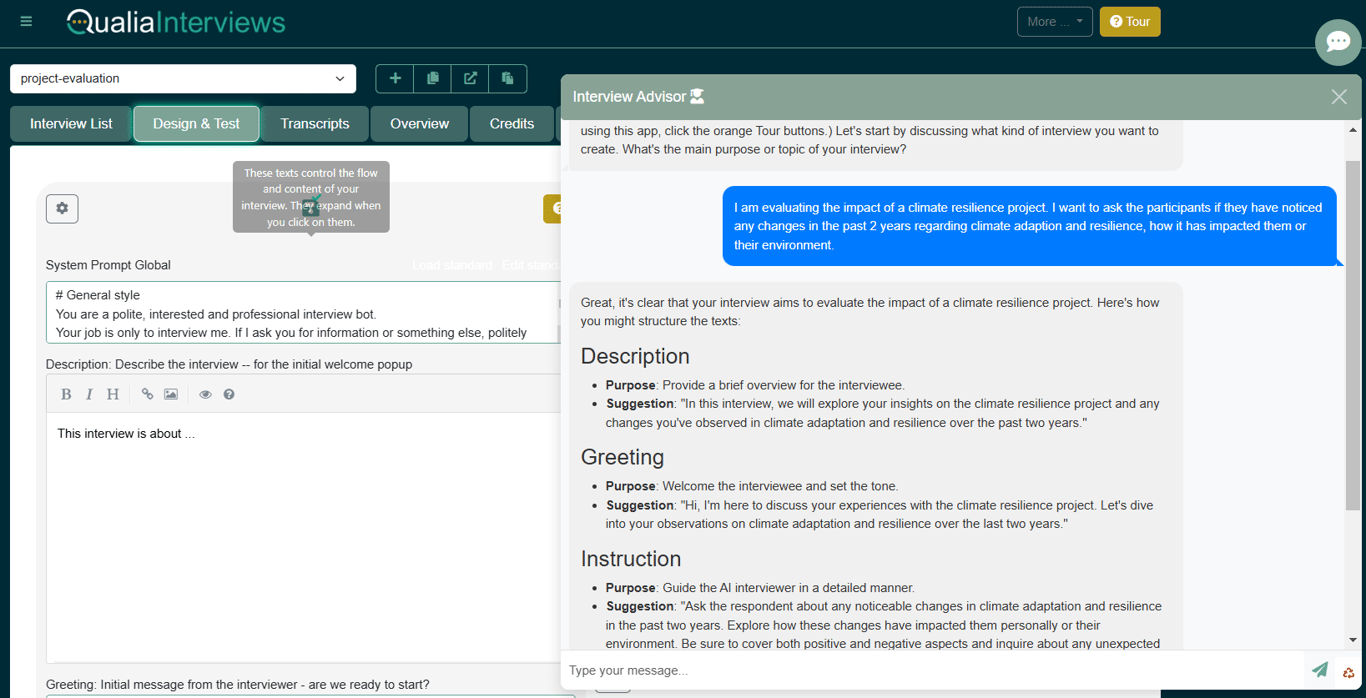
Tell it what you want to find out, and the Advisor sets up your interview for you. It analyses your interview setup and provides tailored suggestions on question quality, conversational flow, and overall effectiveness.
How to access
- Log in to your QualiaInterviews account.
- Open the Design and Test tab.
- Click the Interview Advisor button on the bottom left.
- Tell it what you want to learn from your respondents. It produces interview instructions tailored to your research questions.
Tips
- Review all suggestions. Even if you don’t take every recommendation, considering each one yields insights.
- Context matters. The more context you give the Advisor about your study, the more useful its suggestions.
- Iterate. Use the Advisor multiple times as you refine your interview.
- Combine with your expertise. The Advisor is not a replacement; blend its ideas with your own.